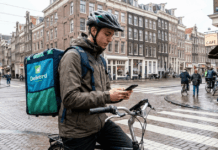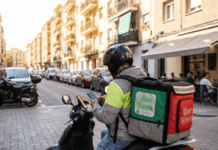
Delivering food with Uber Eats has become a popular way to earn flexible income in many cities worldwide.
This guide is for anyone curious about the process, from first research to your first delivery. The steps apply whether you are a student, someone seeking a side gig, or looking for a more active role in your city.



What Is Uber Eats Delivery and Who Is It For?
Uber Eats is an on-demand food delivery service, connecting couriers with customers who want meals brought to their door. It's available in cities like New York, Los Angeles, London, Paris, and smaller towns across different countries.
Most couriers use bikes, scooters, or cars. Requirements can vary by city, but generally, many people over 18 can apply. If flexibility is a priority, this work stands out as a reliable choice for on-the-go earnings.

Uber Eats Delivery: Key Requirements
Getting started with Uber Eats delivery begins with understanding the basic eligibility requirements. From documents and transportation to local rules, knowing what you need beforehand can make the application process much smoother.
Minimum Age and Documents
Ages 18 (bike) or 19 (car) are typical minimums. Couriers need a valid photo ID or driver’s license, depending on their chosen vehicle.
- Photo identification (government issued)
- Valid driver’s license (for cars/mopeds)
- Proof of vehicle insurance (varies by country)
- Background check consent
Vehicle Type and Safety Standards
Options vary: bikes, scooters, motorcycles, or cars. Smaller cities may only allow bicycles or scooters. Safety equipment, like a helmet, is often recommended.
Smartphone and App Access
Access to the Uber Driver app is required for order management, navigation, and customer communication. Both iOS and Android are supported.
Step-by-Step: How to Apply for Uber Eats Delivery
Becoming an Uber Eats delivery partner starts with a clear application process. Knowing each step in advance can help you prepare the required documents, complete registration correctly, and avoid unnecessary delays.
1. Check City Availability
Start by visiting the main Uber Eats website and entering your city. Availability and requirements may differ locally.
2. Gather Required Information
Preparing the right information and documents beforehand can make registration faster and easier. Checking what is required early also helps prevent missing details from delaying your application.
- Personal ID and contact info
- Valid license and vehicle documents
- Bank account for payouts
3. Create an Account Online
Sign up through the Uber Eats web portal or directly in the app. You may be asked which vehicle you plan to use.
4. Consent to a Background Check
A standard background check will evaluate criminal record and (if driving) your motor vehicle history. The process can take a few days or up to a week.
5. Upload Required Documents
Uploading the correct documents is an important part of completing your application. Clear, valid, and up-to-date files can help prevent verification issues and unnecessary processing delays.
- Scan your ID cards using the app’s camera tool
- Submit vehicle registration and insurance, as requested
6. Attend an Onboarding Session (If Needed)
In some larger cities, new applicants are invited to a short onboarding. This may cover app basics, tips for efficiency, and local delivery etiquette.
7. Activate Your Account
Once approved, log in to the Uber Driver app. You will see the “Go” button to start accepting jobs around your area.
Choosing the Best Vehicle for Uber Eats
Your choice of vehicle can shape everything from delivery speed to daily expenses. Comparing distance, operating costs, local conditions, and comfort can help you choose the most practical option.
Bike
Bikes work best in dense urban zones like Manhattan, London, or Tokyo. Parking is easy and there is low fuel cost, but weather can be tough.
Scooter or Moped
Effective in mid-sized cities such as Rome or Barcelona. Speed is faster than bikes, but legal documents and insurance may be stricter.
Car
Great for suburban or sprawling places like Los Angeles or Houston. There may be higher expenses for fuel and parking compared to bicycles.
Understanding the Uber Eats Driver App
The Uber Eats Driver app acts as the central hub for deliveries, helping couriers receive requests, navigate routes, track activity, and manage essential account information.
Accepting Orders
The app sends a notification for nearby delivery jobs. You can review details, like restaurant and drop-off location, before accepting.
Navigating to Pickups and Drop-offs
The in-app map provides the route. Google Maps and Waze are both integrated for real-time navigation.
Communicating with Customers
Text or call button for contacting customers directly about delays or location specifics. Most users respond within a few minutes.
Maximizing Your Uber Eats Earnings
Earning more with Uber Eats is not simply about completing more deliveries. Smart timing, efficient routes, and careful expense management can help couriers make better use of each working hour.
Work High-Demand Hours
Lunch (11am–2pm) and dinner (5pm–9pm, weekends) typically show the most requests. Surge pricing may apply during those times in cities like Chicago or Paris.
Combine with Multiple Apps
Many couriers also use DoorDash, Grubhub, or Postmates for back-to-back jobs or to compare rates. Multi-apping is common, but check each platform's rules.
Boost Tips with Good Service
Small details can make a big difference in customer experience. Careful handling, clear communication, and reliable delivery can improve service quality and may increase the likelihood of receiving tips.
- Stay polite when picking up or delivering food
- Follow drop-off instructions closely
- Consider insulated bags for food freshness
Managing Payouts and Taxes
Managing delivery income goes beyond watching your weekly earnings. Understanding payout schedules, expenses, records, and tax responsibilities can help you stay organized and avoid financial surprises.
Setting Up Payment Details
Add bank info in the app to receive direct deposits. Most cities payout weekly, and some offer Instant Pay for a small fee.
Tracking Income for Tax Purposes
Your city or country may require you to track delivery-related income. Free tools like Stride can help with mileage and expense logging.
Staying Safe and Professional
Every delivery brings different roads, customers, and situations, making safety and professionalism essential. Good judgment, respectful communication, and responsible driving can help create a smoother experience for everyone.
Protecting Personal Information
Avoid sharing personal contact details outside of the Uber platform. The app anonymizes numbers to maintain safety.
Handling Difficult Situations
Unexpected problems can arise during any delivery, from delays to incorrect orders or unreachable customers. Knowing how to respond calmly and efficiently can help resolve issues while maintaining professional service.
- For issues with orders, support can be accessed 24/7 in the app
- Record any incidents for your records
- Report dangers to Uber immediately
Conclusion: Start Your Uber Eats Journey Confidently
Becoming an Uber Eats courier is accessible to many, especially in cities with high demand for food delivery. With some planning and attention to local requirements, nearly anyone can get started and find a rhythm that matches their lifestyle.
The real key is experimenting with hours, understanding your city’s patterns, and making use of tools for efficiency and safety. If flexibility and earning potential are high on your list, starting with Uber Eats might just fit your goals.