Securing everyday payments safely is becoming a major concern for many individuals. The Noon Pay Card is emerging as a solution offering both convenience and security.
This comprehensive guide aims to inform readers about how to apply online for a Noon Pay Card, discuss its most relevant features, and break down its benefits for practical financial needs.
This article is intended for anyone interested in simplified online payments, digital wallet solutions, or increasing control over spending habits. Whether you’re a regular online shopper or new to digital cards, understanding Noon Pay is essential today.
Readers will learn not only how to apply but also what makes the Noon Pay Card reliable for managing personal expenses and handling everyday transactions smoothly.
Understanding the Noon Pay Card: Features and Benefits
The Noon Pay Card is a digital payment card provided by Noon, designed for online transactions and some select physical purchases. It’s part of a growing ecosystem supporting safe, seamless payments in today’s digital market.
It combines the characteristics of prepaid debit cards and digital wallets. With this card, users can load funds easily and manage spending without linking directly to a traditional bank account.
One notable benefit is its wide acceptance among major merchants. In the realm of online shopping, the Noon Pay Card fits naturally, potentially minimizing the risks associated with inputting credit card data frequently.
Key Features Users May Value
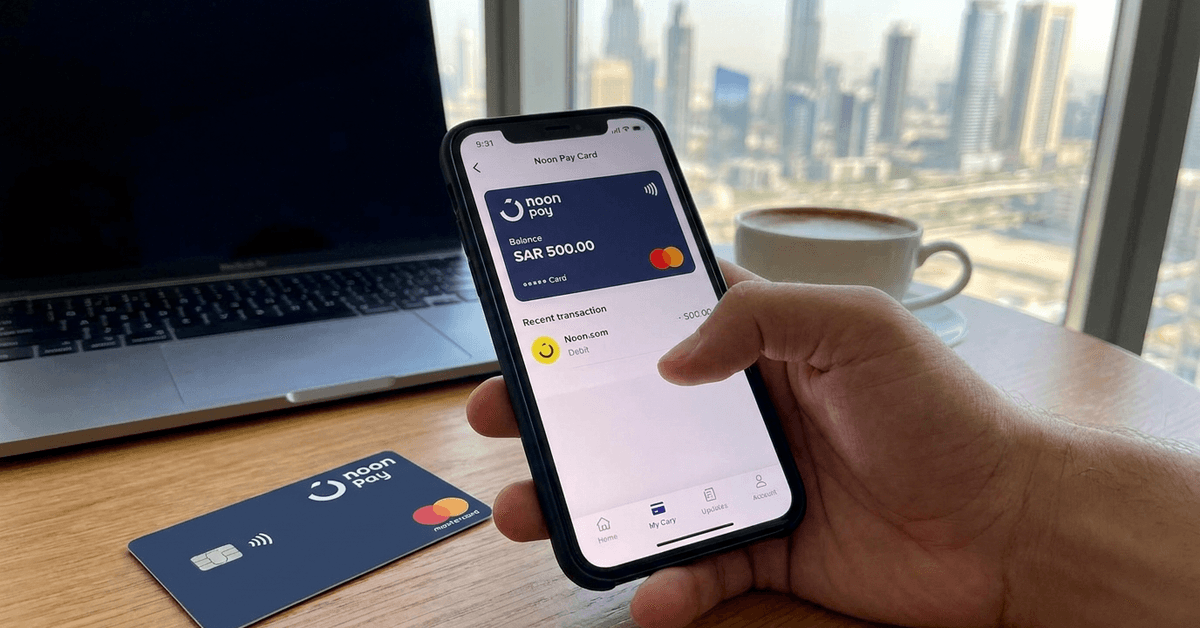
The Noon Pay Card offers in-app card management. From balance monitoring to history tracking, the whole experience is available within the Noon app itself.
Instant card activation is another highlight. The digital version provides fast availability for immediate payments, which is quite practical for urgent purchases.
Security measures include PIN setup, transaction alerts, and optional card locking, aiming to protect against unauthorized activities as much as possible.
Practical Spending Controls
As the Noon Pay Card is prepaid, users might find budgeting a bit easier. Spending is limited to loaded amounts, which can help avoid impulse transactions or accidental overspending.
The coverage is not universal, but for frequently visited e-commerce platforms and grocery deliveries, its usability can streamline day-to-day purchases.
Some people mention a certain relief from not linking their primary bank accounts to every online purchase. With Noon Pay, they only transfer the predefined sum needed for each use.
Who Can Apply for the Noon Pay Card?
Eligibility for the Noon Pay Card revolves around nationality, residency, and age restrictions. Generally, applicants must be residents of the UAE or Saudi Arabia and be over 18 years old, with valid local identification.
The application process is designed to be straightforward. However, it’s possible that users from regions outside the main markets may not have access at this time.
Verification of identity is a critical step for obtaining the Noon Pay Card. Documentation might include Emirates ID or national identification numbers, depending on the location.
How to Apply for a Noon Pay Card Online
The online application process for the Noon Pay Card is managed through the official Noon app or website. The company has streamlined the experience to make onboarding accessible even for digital novices.
The following steps provide a general outline for prospective users. Personal details, identity documents, and mobile number verification tend to be common requirements.
Step 1: Download and Register on Noon
To begin, individuals are encouraged to download the Noon app from official app stores or register at the Noon official website. Creating an account is required before accessing payment products.
After installation, new users complete account setup by validating their contact information. This may include phone number or email verification codes to ensure security.
For those who have previously shopped on Noon, using an existing account can simplify the process as some details might already be present.
Step 2: Navigate to 'Noon Pay' Section
Once registered, users navigate to the “Noon Pay” section within the Noon app menu or dashboard. This hub provides access to card-related services, from applications to balance management.
The option to apply for a new Noon Pay Card is typically visible on the main screen of the payment section. Selecting this guides individuals to the application interface.
Occasionally, app updates may alter menu locations slightly. Checking the FAQ section can provide clarification if the Noon Pay tab is not immediately obvious.
Step 3: Provide Identification Details
Submission of basic identification data is necessary for regulatory compliance. Local ID numbers, date of birth, and address may be required fields during the application.
Photographing or scanning identification documents through the app is part of the identity check. Noon uses this to confirm user legitimacy and support anti-fraud measures.
Sometimes, users report slight delays if documents are unclear, so ensuring quality images at this stage can expedite approval.
Step 4: Card Customization and Confirmation
Certain options might allow applicants to choose card type—digital or physical. While digital delivery is generally instant, physical cards could take several days to arrive at an address.
Final confirmation involves reviewing all provided information. After submission, a confirmation email or SMS with application status typically follows in a short time.
Activating a received digital or physical Noon Pay Card is simple within the app, where users can also set up a PIN and security alerts for added peace of mind.
Reloading and Managing Funds
Loading money onto a Noon Pay Card can be performed via various channels, such as debit cards, bank transfers, or linked digital wallets. Balance updates often reflect instantly or within a few minutes.
Fund management takes place inside the Noon app. It provides tools for viewing transaction history, card status, and available funds—all from a single, clutter-free dashboard.
If the card is lost or stolen, management options within the app allow quick suspension for misuse prevention while support addresses recovery concerns.
Adding Funds via Bank Transfer
Bank transfers to top up Noon Pay Cards remain popular for their reliability. The platform supplies users with instructions and details necessary for successful transfers.
Transfer times depend on the user’s financial institution. Sometimes, external processing times can introduce brief waits even though the Noon side is usually responsive.
Clear record-keeping and notifications within the app may be helpful for those who prefer tracking every transaction thoroughly.
Top Up by Debit or Credit Card
Instant top-ups by debit or credit card provide fast fund availability. This option is practical for urgent online purchases or splitting expenses among friends and family.
It is important to check for any possible fees related to funding the Noon Pay Card. Charges, if any, are usually disclosed during the fund loading process.
Preloading funds before high-volume shopping seasons, such as sales or holidays, can sometimes prevent disruption if banking systems become temporarily busy.
Practical Usage Scenarios and Acceptance
The Noon Pay Card is accepted across the Noon platform and other partner e-commerce portals. Its compatibility makes it suitable for product purchases, bill payments, or subscription services.
Physical card options expand usability to select stores equipped with point-of-sale (PoS) terminals, though acceptance varies depending on location and store agreements.
Some users combine the Noon Pay Card with other digital wallets or loyalty systems to optimize both savings and convenience in everyday spending.
Shopping Online with Noon Pay
Within the Noon platform, checkout using the Noon Pay Card is seamless. Users benefit from additional promotional offers or discounts exclusive to cardholders on occasion.
Payment processing is nearly instantaneous. In most scenarios, purchases are completed in seconds, which may be reassuring when speed matters.
The digital card number is accessed securely for each transaction, minimizing the risk of exposing sensitive information during the process.
Using the Card In-Store
Physical Noon Pay Cards support tap-and-go payments when stores have compatible terminals. A quick tap completes payment, mimicking traditional contactless cards.
For higher-value transactions, some merchants may require additional PIN entry for security. It’s best to be mindful of these thresholds while purchasing.
Merchant acceptance is expanding slowly. Checking availability before relying solely on Noon Pay for physical shopping may still be wise in some situations.
Fees, Limits, and Security Measures
The fee structure for Noon Pay Cards is designed to be transparent. Common charges may include card issuance for the physical version, ATM withdrawals, or cross-border transactions.
Reloading the card, making standard online purchases, and managing the digital version typically involve little to no fees. It’s always a good idea to review the latest terms on the Noon Help Center.
Card limits may apply, including daily transaction caps or overall card balance thresholds. These policies help ensure responsible usage and further safeguard against financial risks.
In terms of security, Noon applies multifactor authentication, transaction alerts, and the option to freeze or unfreeze cards directly through the app interface.
Potential Challenges and Considerations
Though the Noon Pay Card presents numerous benefits, there are certain limitations worth considering. Availability may be restricted to specific countries or regions for now.
Physical cards can take several days to arrive, introducing a short wait period for those needing immediate in-store payments. Digital-only users might not face this issue.
There’s sometimes a mild learning curve in navigating the Noon app, especially for users totally new to digital wallets. Support resources are helpful but exploring initially might take extra time.
Conclusion: Should You Consider Noon Pay Card for Everyday Spending?
The Noon Pay Card addresses practical concerns of modern online shoppers, offering a balance between security and convenience. Its ease of application and prepaid nature enable confident spending without overexposure to potential risks.
For those in supported countries seeking better control over digital purchases, the Noon Pay Card brings clear advantages. The ability to manage funds, review transactions, and protect personal information all from one app simplifies financial routines.
While not perfect for everyone or every situation, the Noon Pay Card represents a step forward in accessible, secure online payments. Exploring its features with a critical eye can help individuals decide if it aligns with their unique needs.